


Figma connector
OAuth 2.0DesignCollaborationConnect to Figma to access user files, teams, projects, and design metadata via OAuth 2.0
Figma connector
-
Install the SDK
Section titled “Install the SDK”Terminal window npm install @scalekit-sdk/nodeTerminal window pip install scalekit -
Set your credentials
Section titled “Set your credentials”Add your Scalekit credentials to your
.envfile. Find values in app.scalekit.com > Developers > API Credentials..env SCALEKIT_ENVIRONMENT_URL=<your-environment-url>SCALEKIT_CLIENT_ID=<your-client-id>SCALEKIT_CLIENT_SECRET=<your-client-secret> -
Set up the connector
Section titled “Set up the connector”Register your Figma credentials with Scalekit so it handles the token lifecycle. You do this once per environment.
Dashboard setup steps
Register your Figma app credentials with Scalekit so it can manage the OAuth 2.0 authentication flow and token lifecycle on your behalf. You’ll need a Client ID and Client Secret from the Figma Developers portal.
-
Create a Figma connection in Scalekit
-
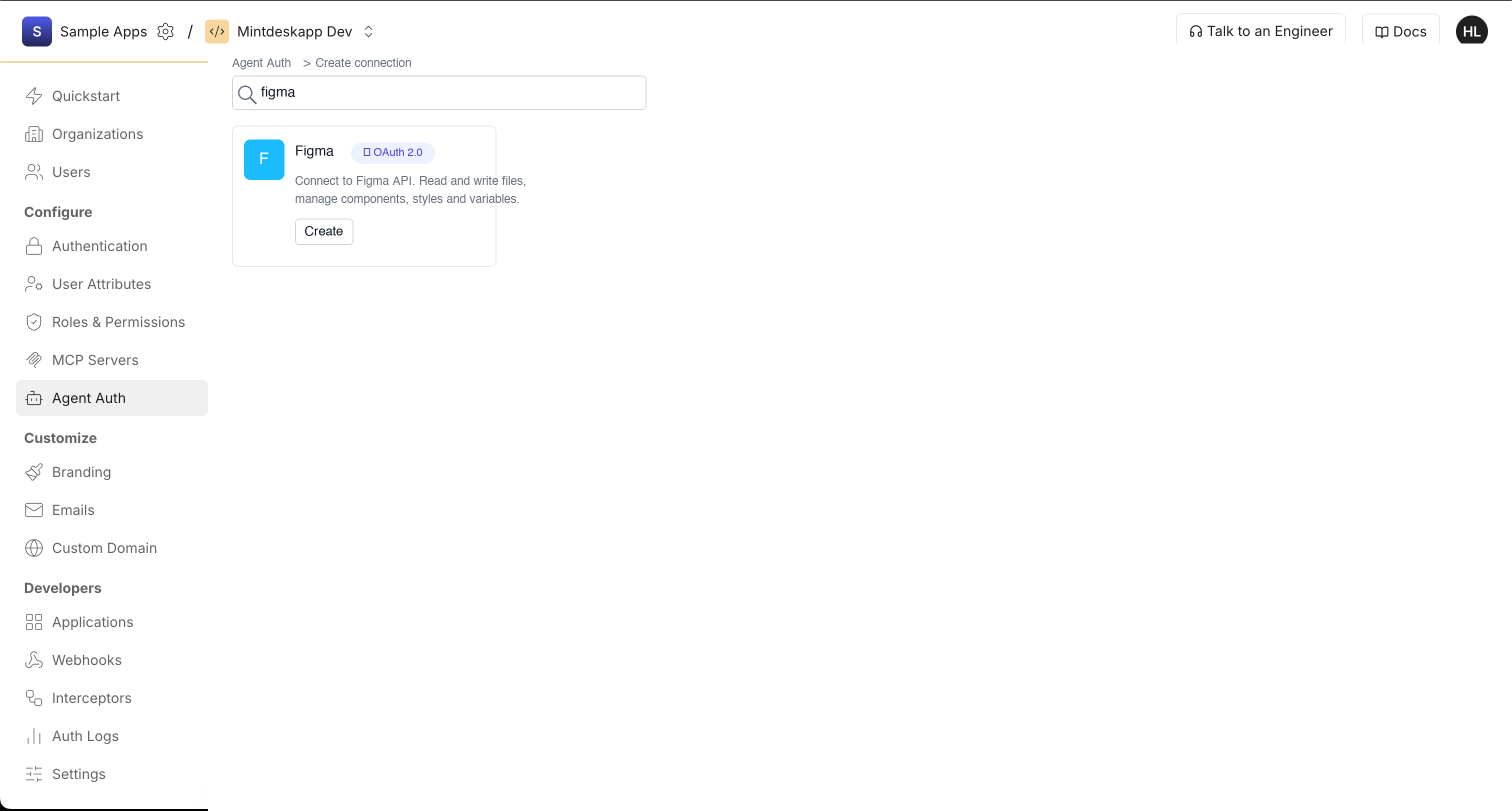
In Scalekit dashboard, go to AgentKit > Connections > Create Connection. Search for Figma and click Create.
-
In the Configure Figma Connection panel, copy the Redirect URI. It looks like
https://<SCALEKIT_ENVIRONMENT_URL>/sso/v1/oauth/<CONNECTION_ID>/callback. You’ll paste this into Figma in the next step.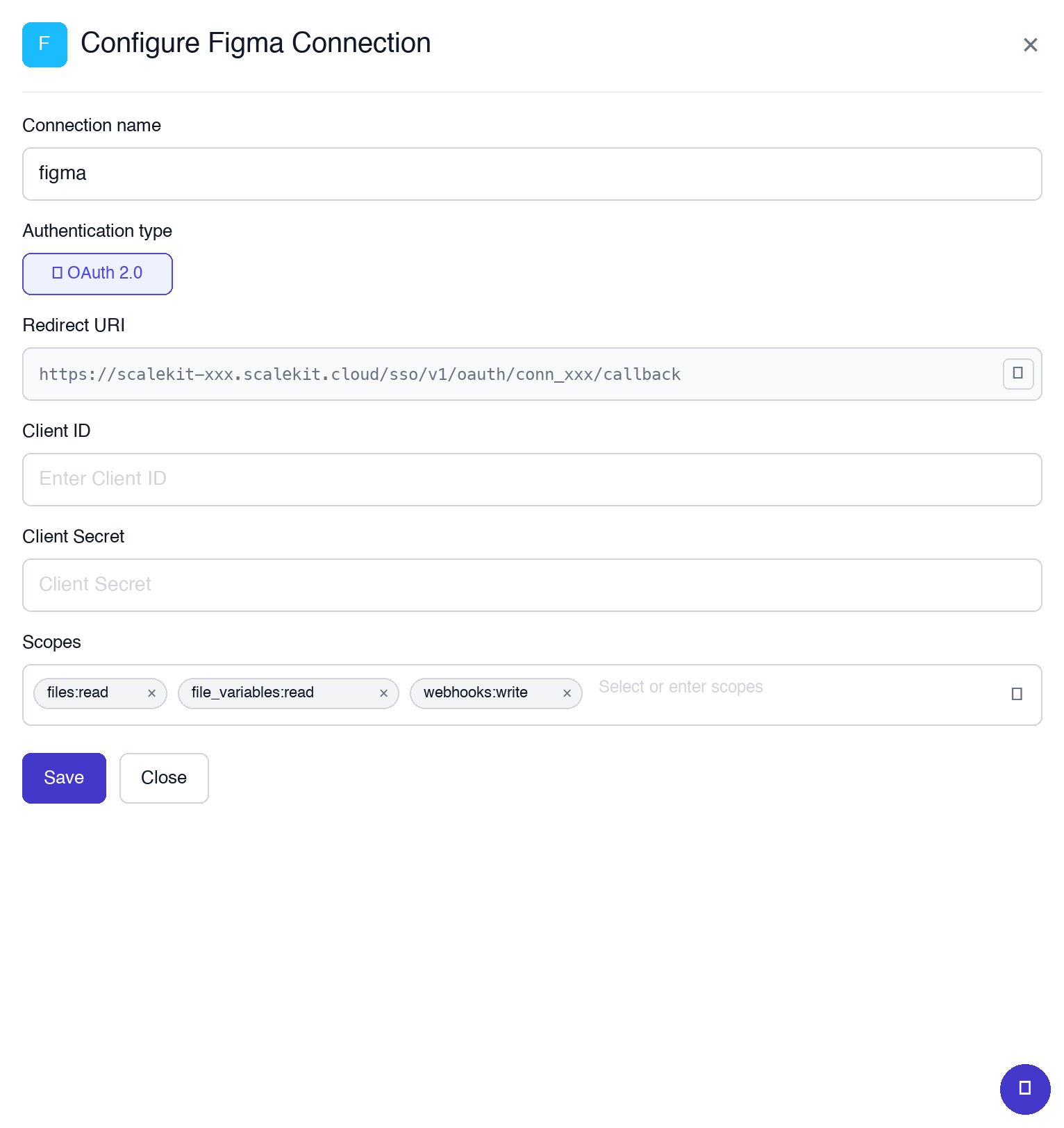
-
-
Create an app in the Figma Developers portal
-
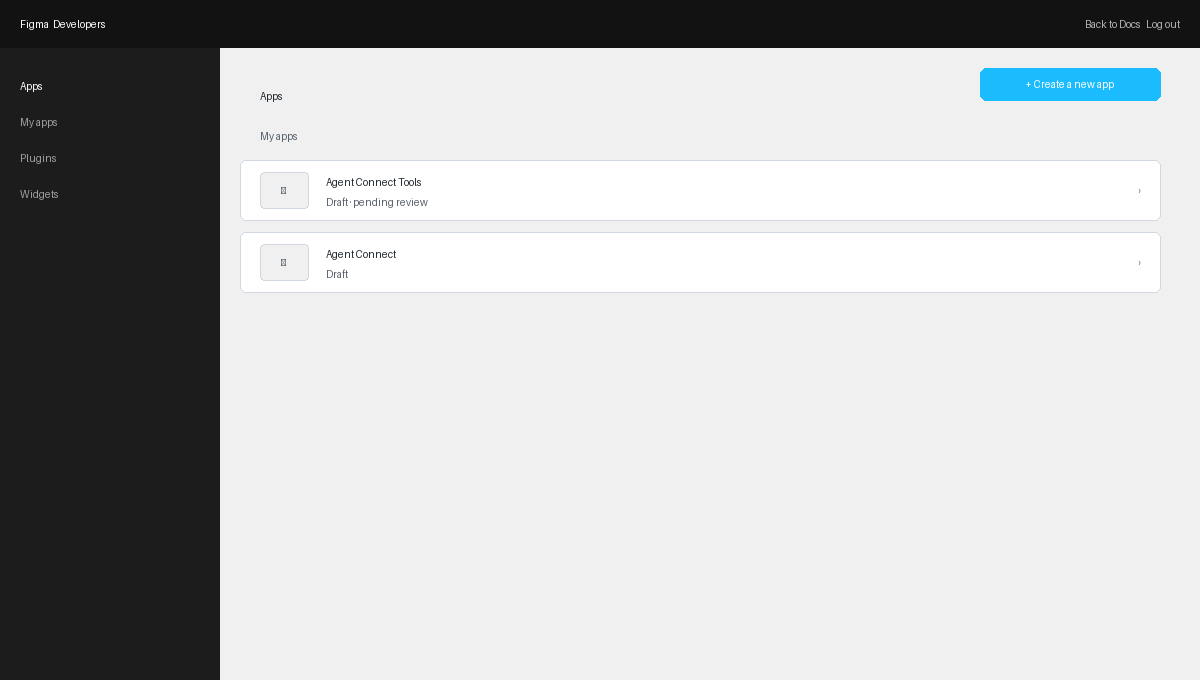
Go to the Figma Developers portal and sign in. Click + Create a new app.
-
Fill in your app name and description, then click Save.
-
-
Add the redirect URI and copy credentials
-
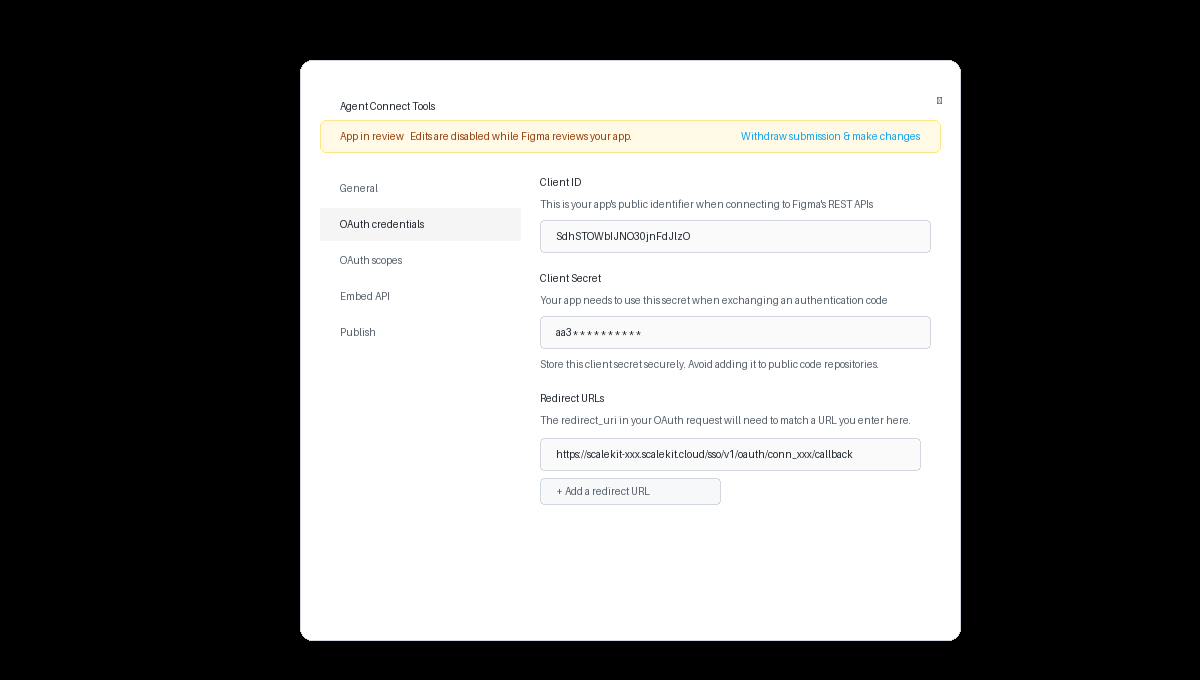
Open your app and click the OAuth credentials tab.
-
Under Redirect URLs, click Add a redirect URL and paste the Redirect URI you copied from Scalekit.
-
Copy the Client ID from the same tab.
-
Copy the Client Secret. Store it securely — never commit it to source control.
-
-
Add credentials in Scalekit
-
In Scalekit dashboard, go to AgentKit > Connections and open the Figma connection you created.
-
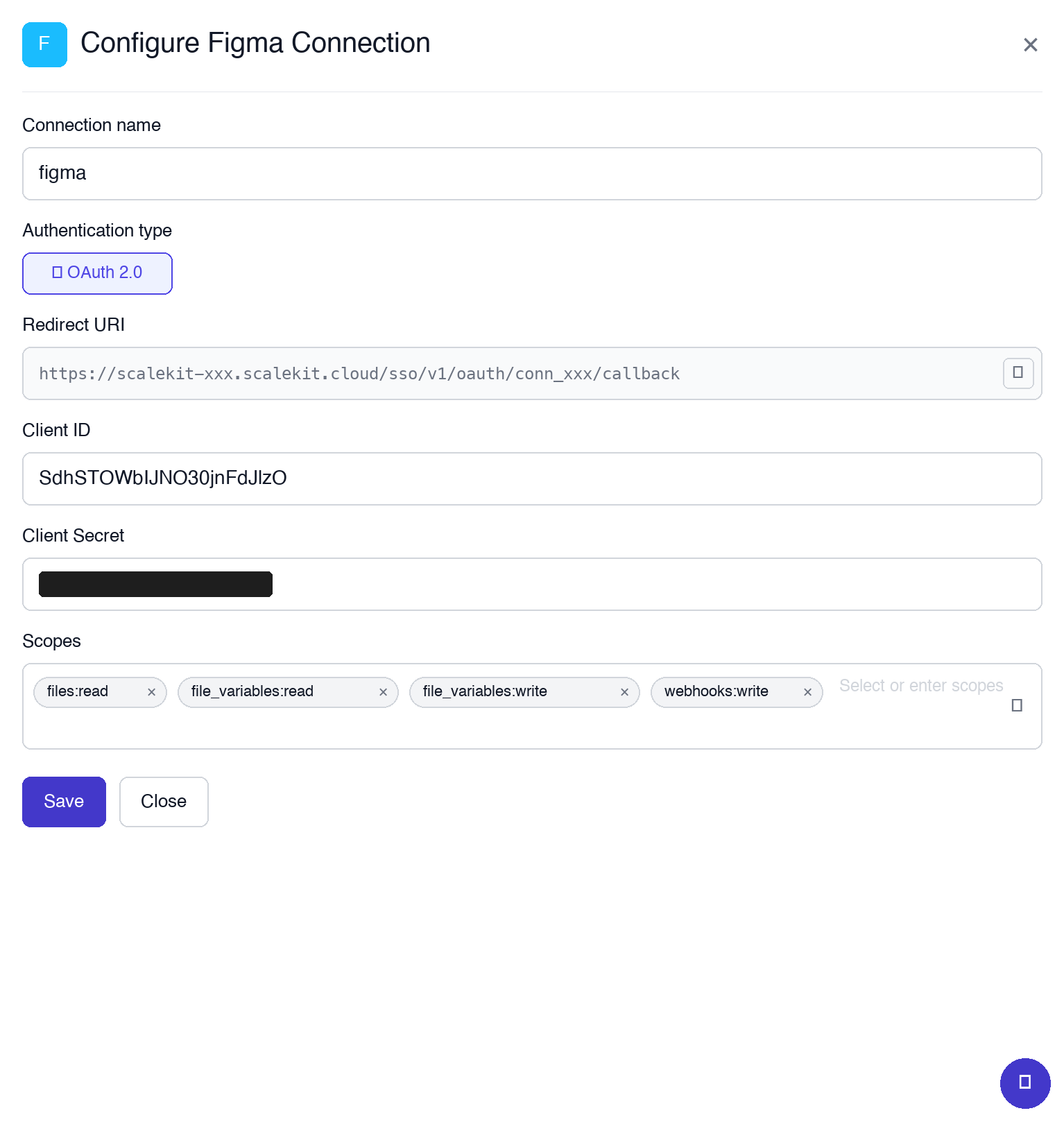
Enter your credentials:
- Client ID — from the Figma OAuth credentials tab
- Client Secret — copied in the previous step
- Scopes — select the permissions your app needs:
files:read— read files, nodes, images, components, and stylesfile_variables:read— read local and published variablesfile_variables:write— create, update, and delete variableswebhooks:write— create, update, and delete team webhooks
-
Click Save.
-
-
-
Authorize and make your first call
Section titled “Authorize and make your first call”quickstart.ts import { ScalekitClient } from '@scalekit-sdk/node'import 'dotenv/config'const scalekit = new ScalekitClient(process.env.SCALEKIT_ENV_URL,process.env.SCALEKIT_CLIENT_ID,process.env.SCALEKIT_CLIENT_SECRET,)const actions = scalekit.actionsconst connector = 'figma'const identifier = 'user_123'// Generate an authorization link for the userconst { link } = await actions.getAuthorizationLink({ connectionName: connector, identifier })console.log('Authorize Figma:', link)process.stdout.write('Press Enter after authorizing...')await new Promise(r => process.stdin.once('data', r))// Make your first callconst result = await actions.executeTool({connector,identifier,toolName: 'figma_activity_logs_list',toolInput: {},})console.log(result)quickstart.py import osfrom scalekit.client import ScalekitClientfrom dotenv import load_dotenvload_dotenv()scalekit_client = ScalekitClient(env_url=os.getenv("SCALEKIT_ENV_URL"),client_id=os.getenv("SCALEKIT_CLIENT_ID"),client_secret=os.getenv("SCALEKIT_CLIENT_SECRET"),)actions = scalekit_client.actionsconnection_name = "figma"identifier = "user_123"# Generate an authorization link for the userlink_response = actions.get_authorization_link(connection_name=connection_name,identifier=identifier,)print("Authorize Figma:", link_response.link)input("Press Enter after authorizing...")# Make your first callresult = actions.execute_tool(tool_input={},tool_name="figma_activity_logs_list",connection_name=connection_name,identifier=identifier,)print(result)
What you can do
Section titled “What you can do”Connect this agent connector to let your agent:
- Get project meta, webhook, file variables local — Retrieve metadata for a Figma project by its project ID
- Delete comment reaction, dev resource, file comment — Removes the authenticated user’s emoji reaction from a comment in a Figma file
- List file components, file component sets, file styles — Returns a list of all published components in a Figma file, including their keys, names, descriptions, and thumbnails
- Create file comment, webhook, comment reaction — Posts a new comment on a Figma file
- Update file variables, webhook, dev resource — Create, update, or delete variables, variable collections, and modes in a Figma file
- Render file images — Renders nodes from a Figma file as images (PNG, JPG, SVG, or PDF) and returns URLs to download them
Common workflows
Section titled “Common workflows”Proxy API call
const me = await actions.request({ connectionName: 'figma', identifier: 'user_123', path: '/v1/me', method: 'GET',});console.log('Authenticated user:', me);
// Example: fetch a file's document treeconst file = await actions.request({ connectionName: 'figma', identifier: 'user_123', path: '/v1/files/YOUR_FILE_KEY', method: 'GET',});console.log('File:', file);me = actions.request( connection_name='figma', identifier='user_123', path="/v1/me", method="GET",)print("Authenticated user:", me)
# Example: fetch a file's document treefile = actions.request( connection_name='figma', identifier='user_123', path="/v1/files/YOUR_FILE_KEY", method="GET",)print("File:", file)Execute a tool
const result = await actions.executeTool({ connector: 'figma', identifier: 'user_123', toolName: 'figma_activity_logs_list', toolInput: {},});console.log(result);result = actions.execute_tool( connection_name='figma', identifier='user_123', tool_name='figma_activity_logs_list', tool_input={},)print(result)Tool list
Section titled “Tool list”Use the exact tool names from the Tool list below when you call execute_tool. If you’re not sure which name to use, list the tools available for the current user first.
figma_activity_logs_list#Returns activity log events for an organization (Enterprise only). Includes events for file edits, permissions changes, and user actions.6 params
Returns activity log events for an organization (Enterprise only). Includes events for file edits, permissions changes, and user actions.
cursorstringoptionalPagination cursor from the previous response to fetch the next batch of events.end_timeintegeroptionalUnix timestamp (seconds) to stop fetching events at.eventsstringoptionalComma-separated event types to filter. All returned by default.limitintegeroptionalMaximum number of events to return (1-1000, default 100).orderstringoptionalSort order: asc or desc by timestamp. Default is desc.start_timeintegeroptionalUnix timestamp (seconds) to start fetching events from.figma_comment_reaction_create#Adds an emoji reaction to a comment in a Figma file.3 params
Adds an emoji reaction to a comment in a Figma file.
comment_idstringrequiredThe ID of the comment to react to.emojistringrequiredThe emoji to react with (e.g. ':thumbsup:').file_keystringrequiredThe unique key of the Figma file.figma_comment_reaction_delete#Removes the authenticated user's emoji reaction from a comment in a Figma file.3 params
Removes the authenticated user's emoji reaction from a comment in a Figma file.
comment_idstringrequiredThe ID of the comment to remove reaction from.emojistringrequiredThe emoji reaction to remove (e.g. ':thumbsup:').file_keystringrequiredThe unique key of the Figma file.figma_comment_reactions_list#Returns a list of emoji reactions on a specific comment in a Figma file.3 params
Returns a list of emoji reactions on a specific comment in a Figma file.
comment_idstringrequiredThe ID of the comment to get reactions for.file_keystringrequiredThe unique key of the Figma file.cursorstringoptionalPagination cursor for next page of results.figma_component_get#Returns metadata for a published component by its key, including name, description, thumbnail, and containing file information.1 param
Returns metadata for a published component by its key, including name, description, thumbnail, and containing file information.
keystringrequiredThe unique key of the component.figma_component_set_get#Returns metadata for a published component set (a group of related component variants) by its key.1 param
Returns metadata for a published component set (a group of related component variants) by its key.
keystringrequiredThe unique key of the component set.figma_dev_resource_create#Creates a dev resource (external link) attached to a node in a Figma file, such as a link to Storybook, Jira, or documentation.4 params
Creates a dev resource (external link) attached to a node in a Figma file, such as a link to Storybook, Jira, or documentation.
file_keystringrequiredThe key of the Figma file containing the target node.namestringrequiredDisplay name for the dev resource link.node_idstringrequiredThe ID of the node to attach the dev resource to.urlstringrequiredThe URL of the external resource.figma_dev_resource_delete#Permanently deletes a dev resource from a node in a Figma file.2 params
Permanently deletes a dev resource from a node in a Figma file.
dev_resource_idstringrequiredThe ID of the dev resource to delete.file_keystringrequiredThe key of the Figma file containing the dev resource.figma_dev_resource_update#Updates an existing dev resource attached to a node in a Figma file.3 params
Updates an existing dev resource attached to a node in a Figma file.
dev_resource_idstringrequiredThe ID of the dev resource to update.namestringoptionalNew display name for the dev resource.urlstringoptionalNew URL for the dev resource.figma_dev_resources_list#Returns dev resources (links to external tools like Storybook, Jira, etc.) attached to nodes in a Figma file.2 params
Returns dev resources (links to external tools like Storybook, Jira, etc.) attached to nodes in a Figma file.
file_keystringrequiredThe key of the Figma file to get dev resources for.node_idsstringoptionalComma-separated node IDs to filter by. Omit to return all dev resources in the file.figma_file_comment_create#Posts a new comment on a Figma file. Can be placed at a specific canvas position or anchored to a specific node.4 params
Posts a new comment on a Figma file. Can be placed at a specific canvas position or anchored to a specific node.
file_keystringrequiredThe unique key of the Figma file.messagestringrequiredThe text content of the comment.client_metastringoptionalJSON string specifying position or node anchor for the comment, e.g. {"node_id":"1:2","node_offset":{"x":0,"y":0}}.comment_idstringoptionalThe ID of the comment to reply to. If provided, this creates a reply to that comment.figma_file_comment_delete#Deletes a specific comment from a Figma file. Only the comment author or file owner can delete a comment.2 params
Deletes a specific comment from a Figma file. Only the comment author or file owner can delete a comment.
comment_idstringrequiredThe ID of the comment to delete.file_keystringrequiredThe unique key of the Figma file.figma_file_comments_list#Returns all comments left on a Figma file, including their text, author, position, and resolved status.2 params
Returns all comments left on a Figma file, including their text, author, position, and resolved status.
file_keystringrequiredThe unique key of the Figma file.as_mdbooleanoptionalIf true, returns comment text as Markdown.figma_file_component_sets_list#Returns all published component sets in a Figma file.1 param
Returns all published component sets in a Figma file.
file_keystringrequiredThe unique key of the Figma file.figma_file_components_list#Returns a list of all published components in a Figma file, including their keys, names, descriptions, and thumbnails.1 param
Returns a list of all published components in a Figma file, including their keys, names, descriptions, and thumbnails.
file_keystringrequiredThe unique key of the Figma file.figma_file_get#Returns a Figma file's full document tree including all nodes, components, styles, and metadata.7 params
Returns a Figma file's full document tree including all nodes, components, styles, and metadata.
file_keystringrequiredThe unique key of the Figma file (found in the file URL).branch_databooleanoptionalInclude data on branches of the file.depthintegeroptionalDepth of the document tree to return (1-4). Lower depth returns faster.geometrystringoptionalSet to "paths" to export vector path data.idsstringoptionalComma-separated node IDs to fetch.plugin_datastringoptionalPlugin IDs to return plugin data for.versionstringoptionalA specific version ID to get. Omit to get the current version.figma_file_image_fills_get#Returns download URLs for all image fills used in a Figma file. Image fills are images that have been applied as fills to nodes.1 param
Returns download URLs for all image fills used in a Figma file. Image fills are images that have been applied as fills to nodes.
file_keystringrequiredThe unique key of the Figma file.figma_file_images_render#Renders nodes from a Figma file as images (PNG, JPG, SVG, or PDF) and returns URLs to download them.11 params
Renders nodes from a Figma file as images (PNG, JPG, SVG, or PDF) and returns URLs to download them.
file_keystringrequiredThe unique key of the Figma file.idsstringrequiredComma-separated list of node IDs to render.contents_onlybooleanoptionalRender only node contents without background.formatstringoptionalImage format: jpg, png, svg, or pdf. Default is png.scalenumberoptionalImage scale factor (0.01 to 4). Default is 1.svg_include_idbooleanoptionalInclude id attributes on SVG elements.svg_include_node_idbooleanoptionalInclude node_id attributes on SVG elements.svg_outline_textbooleanoptionalOutline all text in SVG output.svg_simplify_strokebooleanoptionalSimplify stroke operations in SVG output.use_absolute_boundsbooleanoptionalUse absolute bounding box for rendering.versionstringoptionalA specific version ID to render from.figma_file_nodes_get#Returns specific nodes from a Figma file by their node IDs, along with their children and associated styles and components.6 params
Returns specific nodes from a Figma file by their node IDs, along with their children and associated styles and components.
file_keystringrequiredThe unique key of the Figma file.idsstringrequiredComma-separated list of node IDs to retrieve.depthintegeroptionalDepth of the document tree to return for each node.geometrystringoptionalSet to "paths" to export vector path data.plugin_datastringoptionalPlugin IDs to return plugin data for.versionstringoptionalA specific version ID to fetch nodes from.figma_file_styles_list#Returns all published styles in a Figma file, including color, text, effect, and grid styles.1 param
Returns all published styles in a Figma file, including color, text, effect, and grid styles.
file_keystringrequiredThe unique key of the Figma file.figma_file_variables_local_get#Returns all local variables and variable collections defined in a Figma file. Requires the variables:read scope.1 param
Returns all local variables and variable collections defined in a Figma file. Requires the variables:read scope.
file_keystringrequiredThe unique key of the Figma file.figma_file_variables_published_get#Returns all published variables and variable collections from a Figma file's library. Requires the variables:read scope.1 param
Returns all published variables and variable collections from a Figma file's library. Requires the variables:read scope.
file_keystringrequiredThe unique key of the Figma file.figma_file_variables_update#Create, update, or delete variables, variable collections, and modes in a Figma file. Enterprise plan only.7 params
Create, update, or delete variables, variable collections, and modes in a Figma file. Enterprise plan only.
file_keystringrequiredThe file or branch key to update variables in.schema_versionstringoptionalOptional schema versiontool_versionstringoptionalOptional tool versionvariableCollectionsarrayoptionalVariable collections to create, update, or delete.variableModesarrayoptionalVariable modes to create, update, or delete.variableModeValuesarrayoptionalVariable mode values to set.variablesarrayoptionalVariables to create, update, or delete.figma_file_versions_list#Returns the version history of a Figma file, including version IDs, labels, descriptions, and creation timestamps.4 params
Returns the version history of a Figma file, including version IDs, labels, descriptions, and creation timestamps.
file_keystringrequiredThe unique key of the Figma file.afterstringoptionalReturn versions created after this version ID (for pagination).beforestringoptionalReturn versions created before this version ID (for pagination).page_sizeintegeroptionalNumber of versions to return per page.figma_library_analytics_component_actions_get#Returns analytics data on component insertion, detachment, and usage actions from a library file. Enterprise only.5 params
Returns analytics data on component insertion, detachment, and usage actions from a library file. Enterprise only.
file_keystringrequiredThe key of the library Figma file.group_bystringrequiredDimension to group results by: component or team.cursorstringoptionalPagination cursor from previous response.end_datestringoptionalEnd date for analytics in YYYY-MM-DD format.start_datestringoptionalStart date for analytics in YYYY-MM-DD format.figma_library_analytics_component_usages_get#Returns a snapshot of how many times each component from a library is used across the organization. Enterprise only.3 params
Returns a snapshot of how many times each component from a library is used across the organization. Enterprise only.
file_keystringrequiredThe key of the library Figma file.group_bystringrequiredGroup analytics results by COMPONENT, TEAM, or FILE.cursorstringoptionalPagination cursor from previous response.figma_library_analytics_style_actions_get#Returns analytics data on style insertion and detachment actions from a library file. Enterprise only.5 params
Returns analytics data on style insertion and detachment actions from a library file. Enterprise only.
file_keystringrequiredThe key of the library Figma file.group_bystringrequiredDimension to group results by: style or team.cursorstringoptionalPagination cursor from previous response.end_datestringoptionalEnd date for analytics in YYYY-MM-DD format.start_datestringoptionalStart date for analytics in YYYY-MM-DD format.figma_library_analytics_style_usages_get#Returns a snapshot of how many times each style from a library is used across the organization. Enterprise only.3 params
Returns a snapshot of how many times each style from a library is used across the organization. Enterprise only.
file_keystringrequiredThe key of the library Figma file.group_bystringrequiredGroup analytics results by COMPONENT, TEAM, or FILE.cursorstringoptionalPagination cursor from previous response.figma_library_analytics_variable_actions_get#Returns analytics data on variable actions from a library file. Enterprise only.5 params
Returns analytics data on variable actions from a library file. Enterprise only.
file_keystringrequiredThe key of the library Figma file.group_bystringrequiredDimension to group results by: variable or team.cursorstringoptionalPagination cursor from previous response.end_datestringoptionalEnd date for analytics in YYYY-MM-DD format.start_datestringoptionalStart date for analytics in YYYY-MM-DD format.figma_library_analytics_variable_usages_get#Returns a snapshot of how many times each variable from a library is used across the organization. Enterprise only.3 params
Returns a snapshot of how many times each variable from a library is used across the organization. Enterprise only.
file_keystringrequiredThe key of the library Figma file.group_bystringrequiredGroup analytics results by COMPONENT, TEAM, or FILE.cursorstringoptionalPagination cursor from previous response.figma_me_get#Returns the authenticated user's information including name, email, and profile image URL.0 params
Returns the authenticated user's information including name, email, and profile image URL.
figma_payments_get#Returns payment and plan information for a Figma user or resource, including subscription status and plan type.3 params
Returns payment and plan information for a Figma user or resource, including subscription status and plan type.
resource_idstringoptionalThe ID of the plugin or widget resource.resource_typestringoptionalThe type of resource: plugin or widget.user_idstringoptionalThe ID of the user to get payment info for.figma_project_files_list#Returns all files in a Figma project, including file keys, names, thumbnails, and last modified timestamps.2 params
Returns all files in a Figma project, including file keys, names, thumbnails, and last modified timestamps.
project_idstringrequiredThe ID of the Figma project.branch_databooleanoptionalIf true, includes branch metadata for each file.figma_project_meta_get#Retrieve metadata for a Figma project by its project ID.3 params
Retrieve metadata for a Figma project by its project ID.
project_idstringrequiredThe ID of the project.schema_versionstringoptionalOptional schema versiontool_versionstringoptionalOptional tool versionfigma_style_get#Returns metadata for a published style by its key, including name, description, style type, and containing file information.1 param
Returns metadata for a published style by its key, including name, description, style type, and containing file information.
keystringrequiredThe unique key of the style.figma_team_component_sets_list#Returns all published component sets in a Figma team library, with pagination support.4 params
Returns all published component sets in a Figma team library, with pagination support.
team_idstringrequiredThe ID of the Figma team.afterintegeroptionalCursor for the next page of results.beforeintegeroptionalCursor for the previous page of results.page_sizeintegeroptionalNumber of component sets to return per page.figma_team_components_list#Returns all published components in a Figma team library, with pagination support.4 params
Returns all published components in a Figma team library, with pagination support.
team_idstringrequiredThe ID of the Figma team.afterintegeroptionalCursor for the next page of results.beforeintegeroptionalCursor for the previous page of results.page_sizeintegeroptionalNumber of components to return per page.figma_team_get#List all projects visible to the authenticated user within the specified Figma team.1 param
List all projects visible to the authenticated user within the specified Figma team.
team_idstringrequiredThe ID of the Figma team.figma_team_projects_list#Returns all projects within a Figma team that the authenticated user has access to.1 param
Returns all projects within a Figma team that the authenticated user has access to.
team_idstringrequiredThe ID of the Figma team.figma_team_styles_list#Returns all published styles in a Figma team library, with pagination support.4 params
Returns all published styles in a Figma team library, with pagination support.
team_idstringrequiredThe ID of the Figma team.afterintegeroptionalCursor for the next page of results.beforeintegeroptionalCursor for the previous page of results.page_sizeintegeroptionalNumber of styles to return per page.figma_team_webhooks_list#Returns all webhooks registered for a Figma team.1 param
Returns all webhooks registered for a Figma team.
team_idstringrequiredThe ID of the Figma team.figma_webhook_create#Creates a new webhook that sends events to the specified endpoint URL when Figma events occur in a team.6 params
Creates a new webhook that sends events to the specified endpoint URL when Figma events occur in a team.
endpointstringrequiredThe HTTPS URL to send webhook payloads to.event_typestringrequiredThe event type to subscribe to: FILE_UPDATE, FILE_DELETE, FILE_VERSION_UPDATE, FILE_COMMENT, LIBRARY_PUBLISH.passcodestringrequiredA passcode included in the webhook payload for verification.team_idstringrequiredThe ID of the team to subscribe to events for.descriptionstringoptionalOptional description for the webhook.statusstringoptionalWebhook status: ACTIVE or PAUSED.figma_webhook_delete#Permanently deletes a Figma webhook. This stops all future event deliveries for this webhook.1 param
Permanently deletes a Figma webhook. This stops all future event deliveries for this webhook.
webhook_idstringrequiredThe ID of the webhook to delete.figma_webhook_get#Returns details of a specific Figma webhook by its ID, including event type, endpoint, and status.1 param
Returns details of a specific Figma webhook by its ID, including event type, endpoint, and status.
webhook_idstringrequiredThe ID of the webhook.figma_webhook_requests_list#Returns the delivery history for a webhook, including request payloads, response codes, and timestamps.1 param
Returns the delivery history for a webhook, including request payloads, response codes, and timestamps.
webhook_idstringrequiredThe ID of the webhook.figma_webhook_update#Updates an existing Figma webhook's endpoint, passcode, status, or description.5 params
Updates an existing Figma webhook's endpoint, passcode, status, or description.
webhook_idstringrequiredThe ID of the webhook to update.descriptionstringoptionalUpdated description for the webhook.endpointstringoptionalNew HTTPS URL to send webhook payloads to.passcodestringoptionalNew passcode for webhook verification.statusstringoptionalWebhook status: ACTIVE or PAUSED.