


ChiliPiper MCP connector
Bearer TokenCRM & SalesProductivityAutomationConnect to ChiliPiper MCP. Schedule meetings, manage routing rules, track distributions, and automate handoffs from your AI agents.
ChiliPiper MCP connector
-
Install the SDK
Section titled “Install the SDK”Terminal window npm install @scalekit-sdk/nodeTerminal window pip install scalekit -
Set your credentials
Section titled “Set your credentials”Add your Scalekit credentials to your
.envfile. Find values in app.scalekit.com > Developers > API Credentials..env SCALEKIT_ENVIRONMENT_URL=<your-environment-url>SCALEKIT_CLIENT_ID=<your-client-id>SCALEKIT_CLIENT_SECRET=<your-client-secret> -
Connect your Chili Piper account
Section titled “Connect your Chili Piper account”Get your API token and create a connected account
Register your Chili Piper API token with Scalekit so it stores it securely and injects it into every request. Chili Piper uses bearer token authentication — there is no redirect URI or OAuth flow.
-
Get your Chili Piper API token
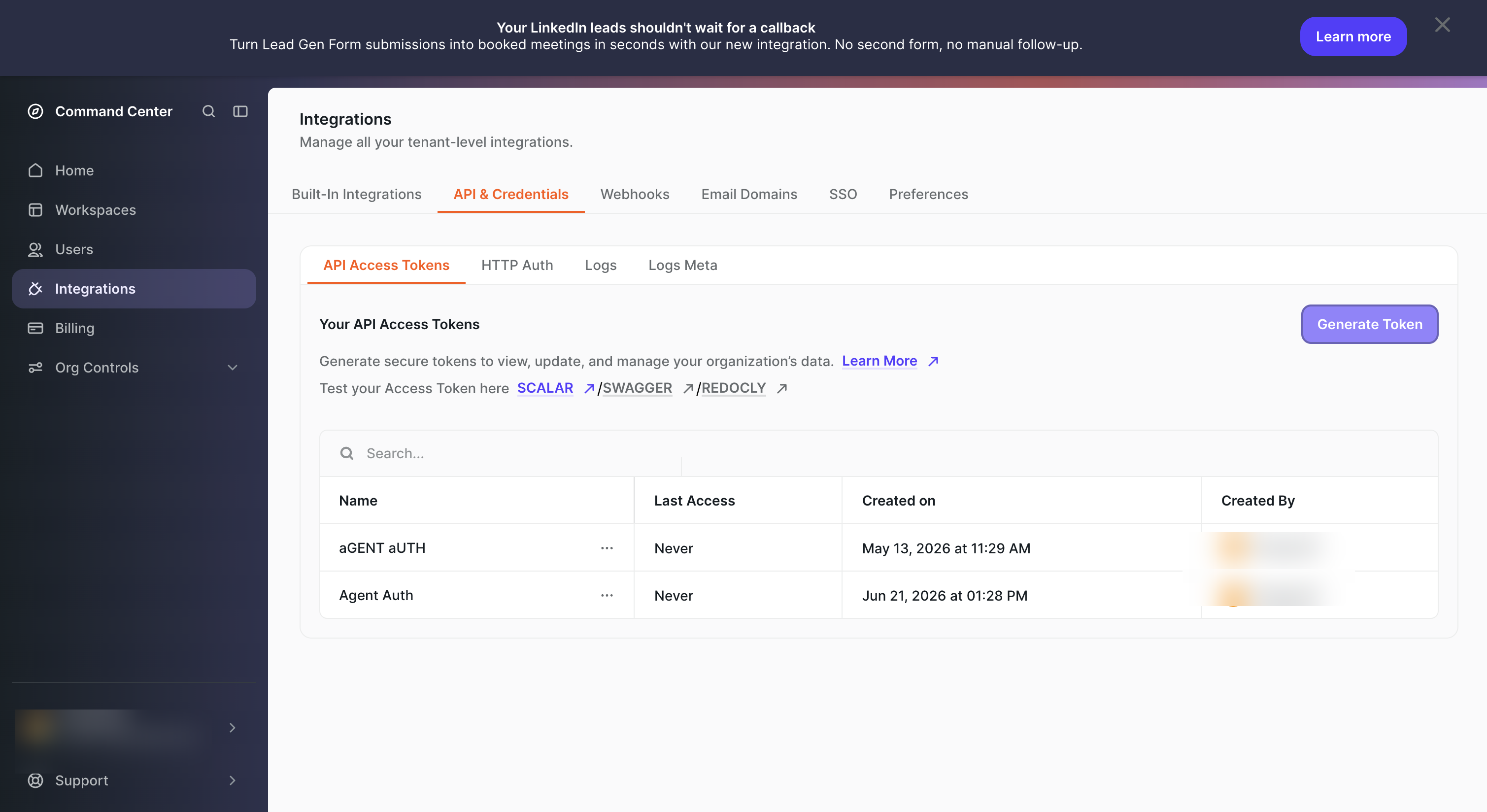
- Sign in to Chili Piper and go to Integrations in the left sidebar.
- Click the API & Credentials tab, then select API Access Tokens.
- Click Generate Token, give it a name (e.g.,
Agent Auth), and copy the token value immediately — it is only shown once.
-
Create a connection in Scalekit
- In Scalekit dashboard, go to AgentKit → Connections → Create Connection. Find ChiliPiper MCP and click Create.
- Note the Connection name — you will use this as
connection_namein your code (e.g.,chilipipermcp). - Click Save.
-
Add a connected account
Connected accounts link a specific user identifier in your system to their Chili Piper API token. Add them via the dashboard for testing, or via the Scalekit API in production.
Via dashboard (for testing)
- Open the connection you created and click the Connected Accounts tab → Add account.
- Fill in:
- Your User’s ID — a unique identifier for this user in your system (e.g.,
user_123) - Token — the Chili Piper API token from step 1
- Your User’s ID — a unique identifier for this user in your system (e.g.,
- Click Create Account.
Via API (for production)
import { Scalekit } from '@scalekit-sdk/node';const scalekit = new Scalekit(process.env.SCALEKIT_ENV_URL,process.env.SCALEKIT_CLIENT_ID,process.env.SCALEKIT_CLIENT_SECRET,);// Never hard-code credentials — read from secure storage or user inputconst chilipiperToken = getUserChilipiperToken(); // retrieve from your secure storeawait scalekit.actions.upsertConnectedAccount({connectionName: 'chilipipermcp',identifier: 'user_123',credentials: {username: chilipiperToken,},});import osfrom scalekit import ScalekitClientscalekit_client = ScalekitClient(env_url=os.environ["SCALEKIT_ENV_URL"],client_id=os.environ["SCALEKIT_CLIENT_ID"],client_secret=os.environ["SCALEKIT_CLIENT_SECRET"],)# Never hard-code credentials — read from secure storage or user inputchilipiper_token = get_user_chilipiper_token() # retrieve from your secure storescalekit_client.actions.upsert_connected_account(connection_name="chilipipermcp",identifier="user_123",credentials={"username": chilipiper_token},)
-
-
Make your first call
Section titled “Make your first call”quickstart.ts import { ScalekitClient } from '@scalekit-sdk/node'import 'dotenv/config'const scalekit = new ScalekitClient(process.env.SCALEKIT_ENV_URL,process.env.SCALEKIT_CLIENT_ID,process.env.SCALEKIT_CLIENT_SECRET,)const actions = scalekit.actionsconst connector = 'chilipipermcp'const identifier = 'user_123'// Make your first callconst result = await actions.executeTool({connector,identifier,toolName: 'chilipipermcp_concierge-list-routers',toolInput: {},})console.log(result)quickstart.py import osfrom scalekit.client import ScalekitClientfrom dotenv import load_dotenvload_dotenv()scalekit_client = ScalekitClient(env_url=os.getenv("SCALEKIT_ENV_URL"),client_id=os.getenv("SCALEKIT_CLIENT_ID"),client_secret=os.getenv("SCALEKIT_CLIENT_SECRET"),)actions = scalekit_client.actionsconnection_name = "chilipipermcp"identifier = "user_123"# Make your first callresult = actions.execute_tool(tool_input={},tool_name="chilipipermcp_concierge-list-routers",connection_name=connection_name,identifier=identifier,)print(result)
What you can do
Section titled “What you can do”Connect this agent connector to let your agent:
- Workspace-remove-users records — Removes one or more users from a specific workspace
- Workspace-remove-users-all records — Removes all specified users from every workspace they belong to
- Workspace-list records — Returns a paginated list of workspaces
- Workspace-list-users records — Returns a paginated list of users in a workspace
- Workspace-add-users records — Adds one or more users to a workspace
- User-update-licenses records — Updates the license assignments for a user, replacing the current license set
Tool list
Section titled “Tool list”Use the exact tool names from the Tool list below when you call execute_tool. If you’re not sure which name to use, list the tools available for the current user first.
chilipipermcp_availability-slots#Returns available meeting slots for any attendee mix (round-robin, manual, team-assigned, additional).5 params
Returns available meeting slots for any attendee mix (round-robin, manual, team-assigned, additional).
attendeesarrayrequiredNo description.expectedHoststringrequiredNo description.intervalstringrequiredNo description.meetingTypeRefstringrequiredNo description.meetingTypeOverridestringoptionalNo description.chilipipermcp_concierge-list-routers#Returns all concierge routers in the workspace.1 param
Returns all concierge routers in the workspace.
workspaceIdstringoptionalNo description.chilipipermcp_concierge-logs#Returns logs of concierge routing activity for a given time range.4 params
Returns logs of concierge routing activity for a given time range.
endstringrequiredNo description.routerIdstringrequiredNo description.startstringrequiredNo description.workspaceIdstringrequiredNo description.chilipipermcp_concierge-route#Executes routing logic without an explicit router slug — the router is resolved from the request body. Identical to concierge-route-by-slug once resolved; optionally returns available slots when interval is provided.3 params
Executes routing logic without an explicit router slug — the router is resolved from the request body. Identical to concierge-route-by-slug once resolved; optionally returns available slots when interval is provided.
formstringrequiredNo description.intervalstringoptionalNo description.optionsstringoptionalNo description.chilipipermcp_concierge-route-by-slug#Executes routing logic for a specific router identified by its slug. Optionally returns available slots for scheduling when an interval is provided.2 params
Executes routing logic for a specific router identified by its slug. Optionally returns available slots for scheduling when an interval is provided.
bodystringrequiredNo description.routerSlugstringrequiredNo description.chilipipermcp_concierge-schedule#Schedules a meeting through a concierge routing session using the routingId returned by concierge-route or concierge-route-by-slug.2 params
Schedules a meeting through a concierge routing session using the routingId returned by concierge-route or concierge-route-by-slug.
bodystringrequiredNo description.routingIdstringrequiredNo description.chilipipermcp_crm-activity#Resolves the ChiliPiper meeting linked to a CRM event ID and returns its admin UI deep-link URL. Accepts 15- or 18-character Salesforce IDs.1 param
Resolves the ChiliPiper meeting linked to a CRM event ID and returns its admin UI deep-link URL. Accepts 15- or 18-character Salesforce IDs.
crmEventIdstringrequiredNo description.chilipipermcp_crm-cancel#Resolves the ChiliPiper meeting linked to a CRM event ID and permanently cancels it. Irreversible — may email attendees. Accepts 15- or 18-character Salesforce IDs.1 param
Resolves the ChiliPiper meeting linked to a CRM event ID and permanently cancels it. Irreversible — may email attendees. Accepts 15- or 18-character Salesforce IDs.
crmEventIdstringrequiredNo description.chilipipermcp_crm-get#Resolves the ChiliPiper meeting linked to a CRM event ID and returns its full record including status, attendees, and scheduled time. Accepts 15- or 18-character Salesforce IDs.1 param
Resolves the ChiliPiper meeting linked to a CRM event ID and returns its full record including status, attendees, and scheduled time. Accepts 15- or 18-character Salesforce IDs.
crmEventIdstringrequiredNo description.chilipipermcp_crm-noshow#Resolves the ChiliPiper meeting linked to a CRM event ID and marks it as a no-show. Not reversible via API. Accepts 15- or 18-character Salesforce IDs.1 param
Resolves the ChiliPiper meeting linked to a CRM event ID and marks it as a no-show. Not reversible via API. Accepts 15- or 18-character Salesforce IDs.
crmEventIdstringrequiredNo description.chilipipermcp_distribution-adjust-v3#Merges adjustments (weights, manual calibration) into an existing distribution and publishes immediately. Uses v3 API — adjustments are additive, not replacements.2 params
Merges adjustments (weights, manual calibration) into an existing distribution and publishes immediately. Uses v3 API — adjustments are additive, not replacements.
bodystringrequiredNo description.distributionIdstringrequiredNo description.chilipipermcp_distribution-create#Creates and immediately publishes a new distribution with the specified assignment type, team, and weights.7 params
Creates and immediately publishes a new distribution with the specified assignment type, team, and weights.
assignmentTypeConfigstringrequiredNo description.teamIdstringrequiredNo description.workspaceIdstringrequiredNo description.cappingstringoptionalNo description.manualCalibrationarrayoptionalNo description.namestringoptionalNo description.weightsarrayoptionalNo description.chilipipermcp_distribution-delete#Permanently deletes a distribution by its ID.1 param
Permanently deletes a distribution by its ID.
distributionIdstringrequiredNo description.chilipipermcp_distribution-list-put#Returns a paginated list of distributions with optional filters.2 params
Returns a paginated list of distributions with optional filters.
paginationstringoptionalNo description.workspaceIdsarrayoptionalNo description.chilipipermcp_distribution-update-v3#Replaces an existing distribution configuration by its ID and publishes immediately. Uses v3 API.2 params
Replaces an existing distribution configuration by its ID and publishes immediately. Uses v3 API.
bodystringrequiredNo description.distributionIdstringrequiredNo description.chilipipermcp_handoff-init#Phase 1 of 2: initializes a handoff flow — launches workspace routers, evaluates assignee availability, and returns routing paths with available slots. Must be followed by handoff-schedule to complete booking.3 params
Phase 1 of 2: initializes a handoff flow — launches workspace routers, evaluates assignee availability, and returns routing paths with available slots. Must be followed by handoff-schedule to complete booking.
bodystringrequiredNo description.userIdstringrequiredNo description.workspaceIdstringrequiredNo description.chilipipermcp_handoff-schedule#Phase 2 of 2: completes a handoff by booking a meeting on a chosen path and slot. Creates calendar events, sends confirmations, and requires the routingId and pathId returned by handoff-init.5 params
Phase 2 of 2: completes a handoff by booking a meeting on a chosen path and slot. Creates calendar events, sends confirmations, and requires the routingId and pathId returned by handoff-init.
bodystringrequiredNo description.pathIdstringrequiredNo description.routerIdstringrequiredNo description.routingIdstringrequiredNo description.userIdstringrequiredNo description.chilipipermcp_health-ping#Checks the health of the ChiliPiper MCP server.0 params
Checks the health of the ChiliPiper MCP server.
chilipipermcp_meeting-activity#Returns the admin UI deep-link URL for a meeting's activity page.1 param
Returns the admin UI deep-link URL for a meeting's activity page.
meetingIdstringrequiredNo description.chilipipermcp_meeting-cancel#Permanently cancels a meeting by its ID. Irreversible — may update calendar/CRM and email attendees.1 param
Permanently cancels a meeting by its ID. Irreversible — may update calendar/CRM and email attendees.
meetingIdstringrequiredNo description.chilipipermcp_meeting-export-v2-put#Exports meetings in a time range with optional filters.4 params
Exports meetings in a time range with optional filters.
endstringrequiredNo description.startstringrequiredNo description.paginationstringoptionalNo description.workspaceIdsarrayoptionalNo description.chilipipermcp_meeting-get#Returns details of a meeting by its ID.1 param
Returns details of a meeting by its ID.
meetingIdstringrequiredNo description.chilipipermcp_meeting-list-put#Returns paginated meetings in a time range with optional filters.4 params
Returns paginated meetings in a time range with optional filters.
endstringrequiredNo description.startstringrequiredNo description.paginationstringoptionalNo description.workspaceIdsarrayoptionalNo description.chilipipermcp_meeting-noshow#Marks a meeting as a no-show by its ID. May trigger CRM and notification workflows.1 param
Marks a meeting as a no-show by its ID. May trigger CRM and notification workflows.
meetingIdstringrequiredNo description.chilipipermcp_resource-scheduler-run#Runs a resource scheduler on demand: executes its configured query and dispatches matched records to the linked executing flow.1 param
Runs a resource scheduler on demand: executes its configured query and dispatches matched records to the linked executing flow.
resourceSchedulerIdstringrequiredNo description.chilipipermcp_rule-create#Creates a new routing rule and activates it immediately. Returns the created rule with its assigned ID and revision.1 param
Creates a new routing rule and activates it immediately. Returns the created rule with its assigned ID and revision.
dtostringrequiredNo description.chilipipermcp_rule-delete#Deletes a routing rule by its ID and revision.2 params
Deletes a routing rule by its ID and revision.
revisionintegerrequiredNo description.ruleIdstringrequiredNo description.chilipipermcp_rule-get#Returns details of a routing rule by its ID.1 param
Returns details of a routing rule by its ID.
ruleIdstringrequiredNo description.chilipipermcp_rule-list#Returns a paginated list of routing rules with optional filters.2 params
Returns a paginated list of routing rules with optional filters.
filterstringoptionalNo description.paginationstringoptionalNo description.chilipipermcp_rule-modify#Modifies an existing routing rule by its ID. Requires the current revision for optimistic locking.3 params
Modifies an existing routing rule by its ID. Requires the current revision for optimistic locking.
dtostringrequiredNo description.revisionintegerrequiredNo description.ruleIdstringrequiredNo description.chilipipermcp_scheduling-link-init#Phase 1 of 2: initializes a scheduling session from a link — fetches link metadata, queries attendee availability, and returns available slots. Must be followed by scheduling-link-schedule.5 params
Phase 1 of 2: initializes a scheduling session from a link — fetches link metadata, queries attendee availability, and returns available slots. Must be followed by scheduling-link-schedule.
intervalstringrequiredNo description.linkstringrequiredNo description.bookerIdstringoptionalNo description.guestEmailstringoptionalNo description.meetingTypeIdstringoptionalNo description.chilipipermcp_scheduling-link-list-admin-one-on-one#Returns all admin one-on-one scheduling links.3 params
Returns all admin one-on-one scheduling links.
filterLinkSlugsarrayoptionalNo description.filterMeetingTypeIdarrayoptionalNo description.filterWorkspaceIdsarrayoptionalNo description.chilipipermcp_scheduling-link-list-group#Returns all group scheduling links.3 params
Returns all group scheduling links.
filterLinkSlugsarrayoptionalNo description.filterMeetingTypeIdarrayoptionalNo description.filterWorkspaceIdsarrayoptionalNo description.chilipipermcp_scheduling-link-list-ownership#Returns scheduling links owned by the current user.4 params
Returns scheduling links owned by the current user.
filterDistributionIdsarrayoptionalNo description.filterLinkSlugsarrayoptionalNo description.filterMeetingTypeIdarrayoptionalNo description.filterWorkspaceIdsarrayoptionalNo description.chilipipermcp_scheduling-link-list-personal#Returns personal scheduling links for a given user.1 param
Returns personal scheduling links for a given user.
userIdstringrequiredNo description.chilipipermcp_scheduling-link-list-round-robin#Returns all round-robin scheduling links.4 params
Returns all round-robin scheduling links.
filterDistributionIdsarrayoptionalNo description.filterLinkSlugsarrayoptionalNo description.filterMeetingTypeIdarrayoptionalNo description.filterWorkspaceIdsarrayoptionalNo description.chilipipermcp_scheduling-link-schedule#Phase 2 of 2: books a meeting on a chosen slot from a scheduling link session. Requires the routeId returned by scheduling-link-init.2 params
Phase 2 of 2: books a meeting on a chosen slot from a scheduling link session. Requires the routeId returned by scheduling-link-init.
bodystringrequiredNo description.routeIdstringrequiredNo description.chilipipermcp_team-add-users#Adds one or more users to a team.2 params
Adds one or more users to a team.
teamIdstringrequiredNo description.userIdsarrayrequiredNo description.chilipipermcp_team-list-put#Returns a paginated list of teams.2 params
Returns a paginated list of teams.
paginationstringoptionalNo description.workspaceIdsarrayoptionalNo description.chilipipermcp_team-remove-users#Removes one or more users from a specific team.2 params
Removes one or more users from a specific team.
teamIdstringrequiredNo description.userIdsarrayrequiredNo description.chilipipermcp_team-remove-users-all#Removes all specified users from every team they belong to.2 params
Removes all specified users from every team they belong to.
userIdsarrayrequiredNo description.workspaceIdsarrayoptionalNo description.chilipipermcp_tenant-get#Returns details of the current tenant.0 params
Returns details of the current tenant.
chilipipermcp_user-find#Searches for users by a query string with pagination.2 params
Searches for users by a query string with pagination.
querystringrequiredNo description.paginationstringoptionalNo description.chilipipermcp_user-find-by-filter#Returns a paginated list of users matching the specified filter.2 params
Returns a paginated list of users matching the specified filter.
filterstringrequiredNo description.paginationstringoptionalNo description.chilipipermcp_user-find-by-ids#Returns users matching a list of user IDs.1 param
Returns users matching a list of user IDs.
userIdsarrayrequiredNo description.chilipipermcp_user-invite#Invites a new user to ChiliPiper by email.6 params
Invites a new user to ChiliPiper by email.
emailstringrequiredNo description.licensesarrayoptionalNo description.namestringoptionalNo description.rolesarrayoptionalNo description.salesforceIdstringoptionalNo description.workspacesarrayoptionalNo description.chilipipermcp_user-read#Returns details of a user by their ID.1 param
Returns details of a user by their ID.
userIdstringrequiredNo description.chilipipermcp_user-update-licenses#Updates the license assignments for a user, replacing the current license set.1 param
Updates the license assignments for a user, replacing the current license set.
updatestringrequiredNo description.chilipipermcp_workspace-add-users#Adds one or more users to a workspace.2 params
Adds one or more users to a workspace.
userIdsarrayrequiredNo description.workspaceIdstringrequiredNo description.chilipipermcp_workspace-list#Returns a paginated list of workspaces.1 param
Returns a paginated list of workspaces.
paginationstringoptionalNo description.chilipipermcp_workspace-list-users#Returns a paginated list of users in a workspace.2 params
Returns a paginated list of users in a workspace.
paginationstringoptionalNo description.workspaceIdstringoptionalNo description.chilipipermcp_workspace-remove-users#Removes one or more users from a specific workspace.2 params
Removes one or more users from a specific workspace.
userIdsarrayrequiredNo description.workspaceIdstringrequiredNo description.chilipipermcp_workspace-remove-users-all#Removes all specified users from every workspace they belong to.1 param
Removes all specified users from every workspace they belong to.
userIdsarrayrequiredNo description.